
TranslucentTB taskbar not clear
TranslucentTB taskbar not clear, even though Clear is selected, almost always comes from the colour setting. Clear means "draw only my colour". If that colour is not fully transparent, you get a tinted bar.
Checked against TranslucentTB 2026.2. Last updated .
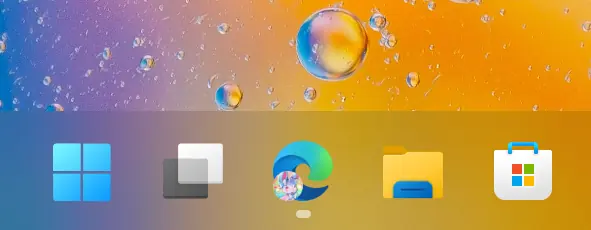
Set the opacity to zero
- Right-click the tray icon and open Desktop.
- Click Accent Color.
- Drag the alpha (opacity) slider all the way down.
- Confirm with the tick.
This is the developer's answer to the question in issue #449. In the config file the same thing is "color": "#00000000". The last two digits are the opacity.
Check which state is active
The Desktop look only applies when nothing else does. If Visible window or Maximized window is enabled with a different look, the taskbar changes as soon as a window is open.
Press Win + D to show the desktop. If the taskbar turns clear now, a window state is the reason. Set that state to Clear too, or untick its Enabled entry.
Acrylic shows as black, grey or plain clear
The developer's checks for this, from issue #938 and related threads:
- Transparency effects must be on. Settings, Personalization, Colors, Transparency effects.
- Battery saver or energy saver must be off. Windows suspends acrylic while it is active.
- Reboot after a graphics driver update. The developer describes broken acrylic right after a GPU driver update as a Windows bug that a restart usually clears.
Some people in #938 still have the problem after all three, and that issue remains open. If Acrylic never works on your PC, a blurred taskbar or a tinted Clear gets close.
The taskbar turns solid when the battery is low
That is intentional. Since version 2021.4 the app shows an opaque taskbar while Windows battery saver is on, because Windows itself drops transparency then. You can choose a different look for that situation. See the battery saver state.
Icons or the clock have a coloured background
The project's tips page covers this: if taskbar elements show a different colouring, turn off the accent colour on the taskbar. In Settings, Personalization, Colors, switch off "Show accent color on Start and taskbar".
Acrylic with StartAllBack
One user with StartAllBack installed got Acrylic back by reinstalling StartAllBack (#1138). That is a single report. StartAllBack has its own taskbar translucency setting, and two tools styling one taskbar tend to clash.
Nothing changes at all
If every look gives the stock taskbar, the app is not reaching the taskbar. Start with the eight-step checklist.
Related pages
- Not working on second monitorOne taskbar transparent, the other not. Causes and the fix in 2026.2.
- Stops after sleep or gets stuckThe taskbar is stuck on the wrong look. The reset shortcut and why it happens.
- Clear vs Acrylic vs BlurThe five looks side by side, with the Windows versions each one needs.
- Transparent taskbar on Windows 11Fully see-through, with the border line removed.
- Transparent taskbar on Windows 10Clear, tinted or blurred, on version 1903 and later.
- Clear taskbar appThe Clear look, from an invisible taskbar to a light tint, and how it combines with auto-hide.
See everything under Fixes.